Main Menu
- Home
- Products
- Applications
- Product Support
- Service
- Learn
- Product News
- About Us
- Contact Us

There are in principle two ways to use DNA for RT60. Both options require the DNA option for building acoustics, SWW-DNA-BA, and Model 831 driver, SWW-DNA-831.
Both methods will give you access to the RT60 display / menu, shown below.
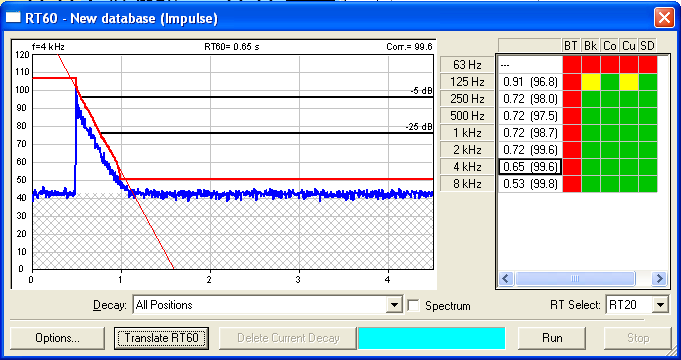
This window allows you to:
- View RT20, RT30, or RT15 data.
- See the spectrum
- Delete a decay
- Translate data for import into DNA for analysis and graphing
Importing data from 831-RT (DNA will recalculate RT15, 20, 30 based on recorded decays)
- Make and store an RT60 measurement on the Model 831.
- Start DNA, connect to the 831, (Analyzer, 831, then click the connect icon).
- In DNA831 analyzer window:
- You can toggle the RT60 window, on or off using the RT60  menu button
Viewing RT60 data in DNA
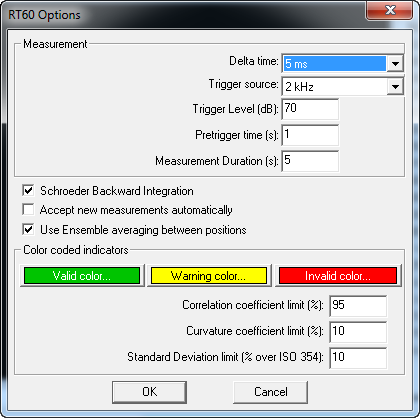
- In the RT60 window, select Options, and put a checkmark in Schroeder Backward Integration and Use Ensemble averaging between positions, then click OK.
- You can save the data in an RTdat file (RT60 Measurement -> Save as from the main menu) and reload later.
- Click Export to doc, select if you want to export all decays, click OK, then you can include your measurement info and click OK. The data will be translated to the DNA document window.
NOTE: You can switch the 831 from RT60 mode to SLM mode using the DNA DirectScreen option in the View drop-down menu. It is recommended to disconnect and reconnect the 831.
Measuring RT60 with DNA and the 831
- Start a new measurement with (RT60 Measurement -> New)
- Turn above display on using RT60 icon
- Push Run and use the Accept/Reject buttons until you Stop
- The Run/Stop acts as position increment just like Start/Stop does on 831.
Translating the RT60 data to DNA for reporting
There are 2 ways here too:
1) Via the graph above using the Export to doc button
2) Or via the RT Measurement -> Translate RT60 menu
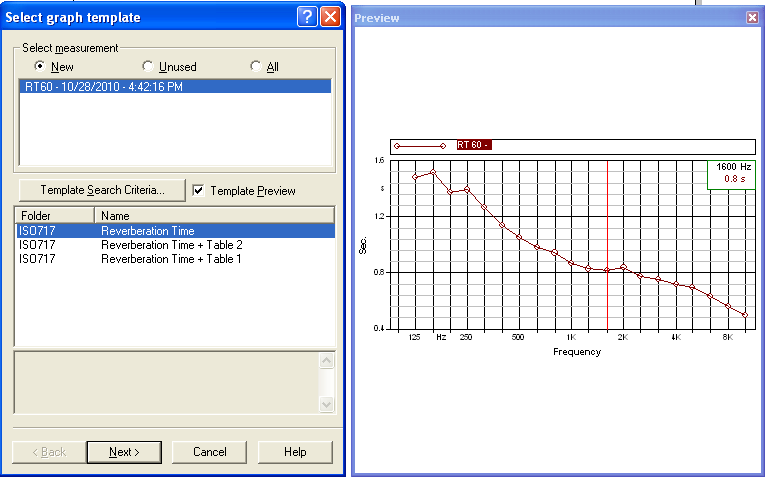
The 3 template options are: RT60 spectrum only
RT60 spectrum with multi-column table (best for 1/3rd octave)
RT60 spectrum with single column table (best for 1/1 octave)
See DNA-BA Architectural Acoustics to further tune the RT results in DNA